Follow the outcome
Run a deployment and verify its outcome
Follow one controlled redeploy to completion, then decide whether to enable merge-triggered automation for that workload.
A durable operation ID and evidence for service state and the public customer endpoint.
On this page
1. Run a controlled redeploy
Complete the read-only connection checks first. Choose an enrolled, managed workload with a known recovery path. The grant must include deployment:redeploy and operation:read.
Redeploy YOUR_DEPLOYMENT_SLUG through GroundControl using one idempotency key for this request. Return the operation ID, follow it until terminal status, and report runtime and public verification. If a call times out, retrieve that same operation before attempting another redeploy.The tool returns an operation immediately. Keep that ID: it is how the conversation reconnects to work that continues independently. The client may still ask you to confirm the write action.
2. Follow the operation, not the chat connection
| State | What to do |
|---|---|
| pending / running / verifying | Keep reading the same operation ID. Do not submit a duplicate request. |
| success | Read its verification evidence; check the public outcome. |
| failed | Read the recorded error and failed stage before choosing recovery. |
| uncertain | Inspect actual runtime and evidence. A restart may have interrupted tracking after an external action began. |
A network timeout is not proof that a deploy failed. Reuse the original idempotency key if retrying the same request, and retrieve the existing operation before starting a new one.
Read operation OPERATION_ID through GroundControl and report its current status, attempts, error and verification evidence. Do not start another deployment.3. Inspect the result in GroundControl
Open Deployments → your application → Deploy → View evidence. Review the Compose validation, runtime recreation, service verification and public checks. Releases retains release records; the deploy view shows execution evidence.
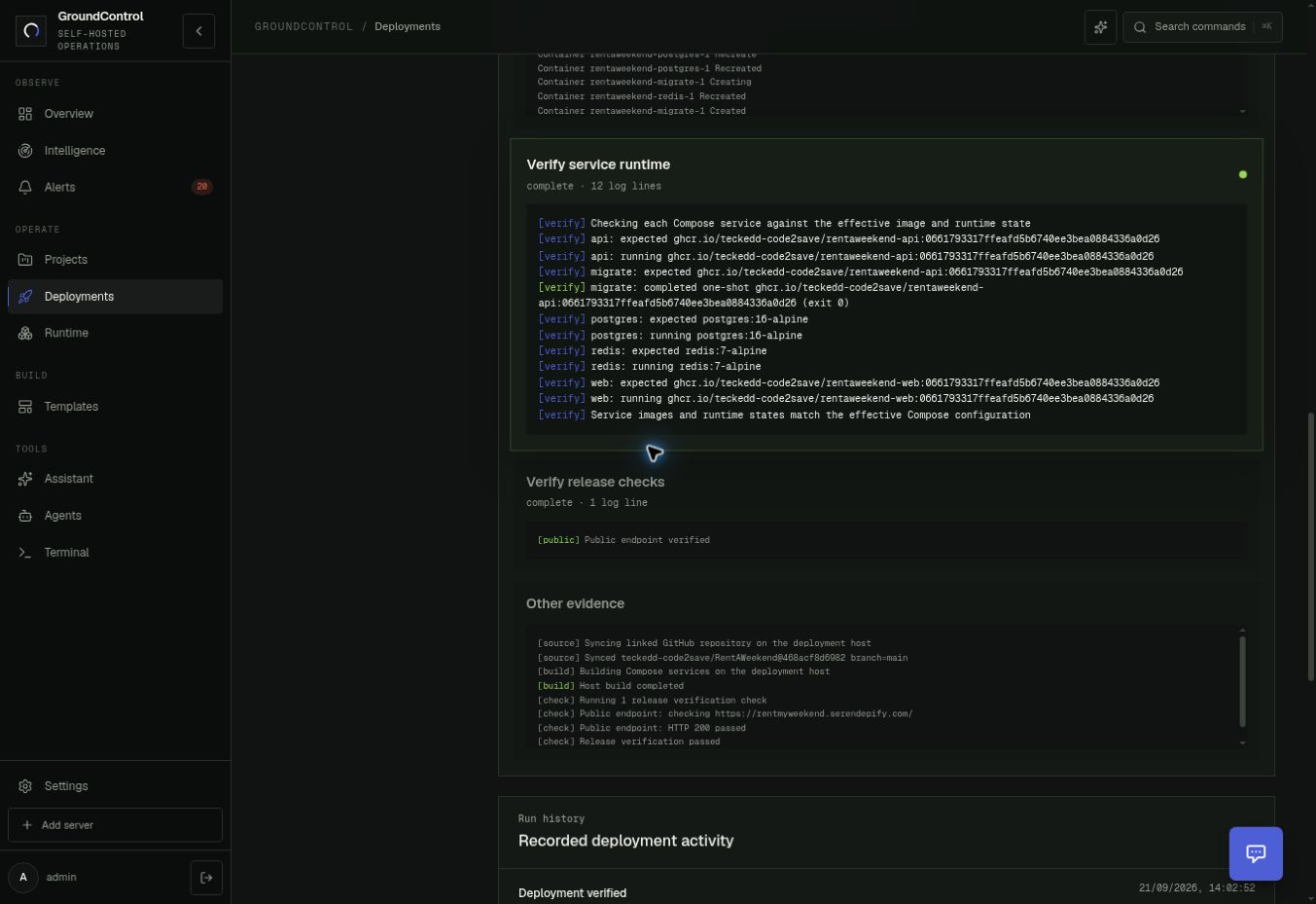
Confirm every intended long-running service is healthy, one-shot migrations exited successfully, and the configured public check passed. Compare the recorded source revision with the actual image identity; those are distinct evidence fields.
4. Enable deployment-scoped automation
For a supported managed Compose deployment with an explicitly linked GitHub repository, open Configure → Source identity.
- Confirm the selected GitHub installation repository, default branch, public URL and deployed revision.
- Check the GitHub connector has working signed webhook delivery. A pasted repository URL alone does not establish that connection.
- Verify the environment and Compose contract, release checks, build location and recovery plan.
- Enable Autopilot after merge, then select Save source.
- Send a small approved test change through the normal review/merge path. Verify a new operation and public result before relying on the flow.
The checkbox is disabled when the deployment is not managed or no linked repository is selected. Enabling it does not grant all repositories or all hosts autonomy.
Current source-deploy evidence includes a build on the deployment host. Do not assume turning on this option moves builds into CI. Confirm the chosen path and host capacity; an isolated CI builder is the preferred production architecture.
Where Daytona fits
Daytona is an optional, early-access workbench for reproducing eligible source/configuration failures. In Configure → Repair workbench, a deployment can select Use Daytona for source repairs and provide focused validation and regression commands. Connector credentials live in Settings → Connectors.
The intended flow checks out the exact revision in an isolated sandbox, validates a candidate fix, then proposes a reviewable change. A sandbox setup failure is not evidence that the application is broken. Daytona is not required to connect an agent or perform a standard redeploy.
GroundControl’s own releases still use its repository-owned GitHub Actions pipeline. The managed-application webhook flow is a separate path.